


Library Technology at Your Fingertips
In this strange age of scandalous ink subscriptions and promptly obsolete laptops, I often find it easier to utilize shared computer equipment than worry about keeping my own gadgets up to date. If you ever find yourself in a technological jam, the library might have just the machines you are looking for!
Compute!

We host 24 public computers that can be used at any time, without a reservation. You can surf the web, access Microsoft Office programs (Word, Excel, Power Point, Publisher), or view & print image and PDF files.
No need to worry about your personal data! Each time you log out of a library PC, all your browsing history and downloaded files are erased and the PC starts over fresh and clean for the next customer.
We also offer free public Wi-Fi to all of our customers if you prefer to bring in your own device.
Come prepared!! Here’s what to bring for a successful public computer experience:
- Library Card
- Your name and library card number can be used to log in to our public PCs
- If you do not have a library card, stop at any one of public desks on the 2nd floor and staff can help you access a PC
- Cell phone
- If you plan on logging in to a personal account (like email) using our computers, you will need to verify your identity. Typically, this verification will require the use of a cell phone number that has already been tied to the account you plan to access. If you do not have a phone or alternative way to verify your identity online, you will likely not be able to access any personal accounts on our public computers
- Storage Device (optional)
- Our computers are compatible with USB & SD storage devices
- If you need to access files on a CD or DVD, our staff can lend you an external disc drive (library use only)
- Headphones (optional)
- Sound features can only be accessed on our PCs with personal headphones.
- $1 earbuds are available for purchase at the 1st floor desk.
- Cash (if you plan to print or copy)
- All of our printers and copiers operate on a cash only system
Print & Copy!
We are set up for a wide variety of typical printing and copying needs and there are a number of options for you to get your print materials to us!
- Direct print
- Anything accessed on one of our public PC’s can be sent directly to the print queue
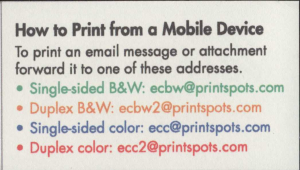 Email
Email
- You can send any document as an attachment directly to our print queue using these email addresses
- Any documents emailed to the queue will remain available to print for 48 hours
- Remote Upload
- Our technology webpage has a “Remote Printing Service” which can be used to upload any document from your personal computer. You will still need to come to the library in order to pay for and print your document.
- Any documents uploaded to the queue will remain available to print for 48 hours
- Physical Copies
- Our public copier can scan and copy any physical document within our size capabilities
REMINDER: Both our printer and copier operate on a cash only system.
Large print jobs may also be paid for by check.
Printing sizes* and costs:
8 ½” x 11” Black & White —————- $0.10 per printed side
8 ½” x 11” Color —————————- $0.25 per printed side
8 ½” x 14” Black & White ————– $0.10 per printed side
8 ½” x 14” Color —————————- $0.25 per printed side
11” x 17” Black and White ————— $0.20 per printed side
11” x 17” Color —————————— $0.50 per printed side
*All options can be printed as single or double-sided.
*8 ½” x 14” & 11” x 17” sizes can only be printed at the public copier.
Scan!
Located in our 2nd floor Business Center, our scanner is free to use and can create a digital copy of any document(s). Once digitized, these files can be sent to you via email, USB, or directly to your phone with a QR code. This particular scanner utilizes a touchscreen, so feel free to poke around!
Our 2nd floor desks are always staffed, so don’t hesitate to ask if any issues arise during your visit.
If you have additional questions about our technology services, feel free to give us a call at 715-839-1648 ext. 3



Add a Comment
Now we'd like to hear your thoughts! Comments and suggestions are welcome!