


Seeking Books on Your Own Terms
As mercurial March
Ebbs up, up, and away
We humbly dare you: ‘Read!’
While sunbeams beckon: ‘Play!’
Our yearly reading challenge is well underway, but its not too late to join! This year’s theme is “Body of Reading”, and we invite participants to read one book from each body-part driven category. While we offer free booklets full of suggestions for each category, every book you choose is entirely up to your own interpretation of the theme. April’s category is Ears: highlighting the impact of sound and music in our lives, as well as secrets, half-truths, and dystopian shrouds. You might choose a direct analysis of music’s impact on our lives, or an on the nose work of fiction, or a mythological nod to song, rife with rumor. Make the challenge your own; free association is highly encouraged!
I have the privilege of helping create the book displays for this reading challenge, and it is by far one of my favorite ongoing projects. There are a variety of resources I use to curate these displays which our customers can also access.
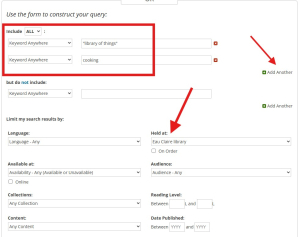
The first place I start is often the MORE catalog, specifically, the Advanced Search function. This customizable search page may appear overwhelming, but it is the best tool to narrow (or carefully widen) your catalog results. For example, the best way to search our extensive Library of Things is to use the phrase “library of things” (in quotations) as one keyword search, along with a secondary keyword (click “add another”) to narrow your results. Finally, by changing the “Held at:” filter to “Eau Claire library”, the search will show items that are both available AND checked out! This way, you can place holds on materials that would not show up when using the standard “Available at” filter on a simple keyword search from the homepage. The advanced search will also allow you to search by publication year, exclude unwanted search terms, and browse individual library collections!
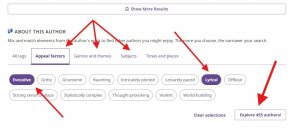
Novelist Plus is another excellent resource for finding library materials tailored to your personal preference. After logging in with a library card, you can begin with a quick search for an author or book in top search bar. Novelist will offer instant read-a-like recommendations for individual titles and authors. Once you’ve found something of interest, you can easily customize a similar search with the tags found at the bottom of the page: simply click to highlight the categories that match your tastes and then “Explore”!
Digital resources can be quick and effective, but online search engines will always be limited by pre-defined terms and they are rarely comprehensive. In order to offer the widest possible variety of materials, I make a point to slow down and physically browse the stacks (bookshelves) in the library as well. Without fail, my wanderings produce dozens of on-theme titles that would likely have never come across my radar utilizing a search engine alone. I cannot overstate the bliss of unearthing your next read by pulling an unexpected book from between its brethren on a whim. So come, if you dare, and plumb the depths of our eclectic repertoire. And don’t forget to grab a reading challenge booklet on the 2nd floor, for even more paperback (and hardcover) propositions.
Abundant aisles traced by
Stoic curious strides
Yield fortuitous fruit
Secrets bound in plain sight



Add a Comment
Now we'd like to hear your thoughts! Comments and suggestions are welcome!